How to Create a Google Business Profile (2026 Step-by-Step Guide)
Learn how to create and verify your Google Business Profile in 2026. Step-by-step guide to boost your local SEO and online visibility.
What Is Google Business Profile?
Google Business Profile (GBP) is a free tool that allows businesses to manage their online presence on Google. With this profile, you can control how your business appears in Google Search and Google Maps, and provide potential customers with important information such as your business address, phone number, and business hours.
Many businesses use Google Business Profile to reach local target audiences. For businesses with physical locations like cafes, restaurants, and retail stores, this tool is essential for increasing online visibility and improving customer engagement.
Having your business properly listed, along with customer reviews and ratings, can help you attract more customers. This makes it a powerful tool for improving your local SEO performance and ranking higher on Google.
Why Creating a Google Business Profile Matters
Google Business Profile is one of the most effective ways to strengthen your business's online presence. It holds significant importance in local SEO strategies. A properly optimized profile makes your business more visible on Google and helps you get ahead of competitors in local searches.
Customers can contact you directly by viewing your business profile, find your address, or check your business hours. This is especially valuable in competitive sectors where it increases the likelihood of customers choosing your business.
Additionally, user reviews on your profile can influence potential customers' decisions. Positive reviews and high ratings strengthen your business's reputation and help you acquire new customers.
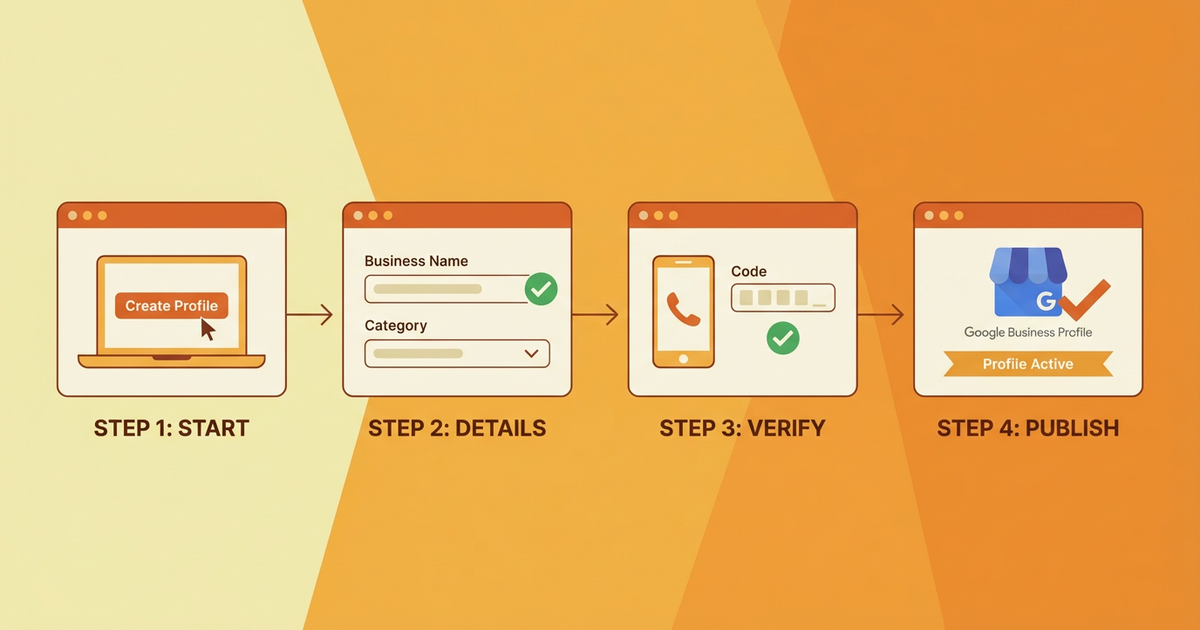
How to Create a Google Business Profile
1. Create a Google Account or Sign In
To create a Google Business Profile, you first need a Google account. If you do not have one, go to the Google Account Creation page to quickly create one. If you already have a Gmail account, you can sign in with that.
After signing in with your Google account, go to the Google Business Profile website (https://www.google.com/business/) and click the "Get Started" button. This will take you to the beginning of the profile creation process.
2. Enter Your Business Information
One of the most important steps when creating your business profile is entering your business information completely and accurately. Enter your business name, address, phone number, and website correctly. This information will make it easy for customers to reach you.
Accurate address information is especially important. Correctly pinpointing your business location on Google Maps makes it easier for customers to find you. Additionally, clearly specifying your business hours will improve customer satisfaction.
3. Select Categories and Service Areas
Accurately specifying the sector in which your business operates is critical for profile optimization. When creating your Google Business Profile, you will need to select your business category. For example, if you run a restaurant, you should select the "Restaurant" category. Category selection affects which searches your business appears in.
You can also add the services and products your business offers. This allows potential customers to learn about the specific services your business provides. For example, if you run a cafe, you can list the coffee varieties and other items on your menu.
Verify Your Business Profile
1. Understand Verification Methods
After creating your Google Business Profile, you need to verify your profile. Verification confirms that your business actually exists and that the information you provided is accurate. Google typically uses the postcard method to verify business addresses. A postcard containing a verification code is sent to your business address.
Additionally, verification can also be done by phone or email. The most common verification method is the postcard, so make sure you have entered your business address correctly.
2. Complete the Verification Process
Once you receive the verification code, go to the verification section in your Google Business Profile and enter the code. This step activates your profile and helps your business become visible in Google Search and Maps.
The verification process helps your business present a more professional appearance to customers. A verified profile is also important for credibility and reputation. Your customers will know that your business genuinely exists and offers a reliable service.
Optimize Your Google Business Profile
1. Keep Business Information Up to Date
After creating your Google Business Profile, make sure your profile information is current and accurate. If your business hours, address, or contact information changes, update this information immediately. Up-to-date information is critical for customer satisfaction and helps your business maintain a professional image.
Additionally, regularly uploading photos to your profile can increase engagement. Interior and exterior photos of your business help potential customers get to know your business better.
2. Manage Customer Reviews
Customer reviews are vital to the success of your Google Business Profile. Positive reviews boost your business's reputation, while negative reviews can drive away potential customers. Therefore, it is important to respond to reviews quickly and professionally.
Sending thank-you messages for positive reviews increases customer satisfaction. For negative reviews, taking a constructive approach to resolving customer complaints helps protect your business's reputation.
Conclusion
Google Business Profile is an effective way to increase your business's online visibility. By following the steps in this guide, you can make your business more visible on Google and reach potential customers more easily. Remember, properly optimizing your Google Business Profile is crucial for leveraging the power of local SEO.
Call to Action
Create your Google Business Profile today to strengthen your business's online presence and attract more customers! Contact us for more information and professional support. We would be happy to work with you on the path to success!
Author
ajanslokal Team
We create content about digital marketing strategies and solutions for local businesses.
Interested in this service?
Stand out on Google. Manage your business with professional tools.
Learn MoreGrow Your Business in the Digital World
Be more visible on Google, win more customers. Get your free digital presence audit now!
Get Free Audit